
Your File Names Are Costing You Time
Why the Way You Name Your Files Is Costing You Time
I once spent twenty minutes looking for a quote I had written for a client.
I knew it existed. I had written it. I could picture the conversation. But somewhere between saving it and needing it again, it had disappeared into a folder called something like Misc 2022 or Documents New or possibly just Untitled.
Twenty minutes is a long time when you are trying to look professional on a phone call and I had to say I'd call her back in a minute.
If you run a creative business - especially one where every commission is different - your files are the paper trail of your entire working life. Quotes, reference photos, client briefs, invoices, supplier receipts, design files, finished work. Every job generates documents. And if those documents are not named and stored in a way that makes them findable, you are not filing them - you are losing them slowly.
This is not a technology problem. It is a habit problem. And like most habit problems, the fix is simpler than you think.
Why file names matter more than you realise
Most people name files the way they name things when they are in a hurry. Whatever comes to mind. Whatever the software suggests. Document1.docx. Scan0047.pdf. IMG_3821.jpg.
These names made sense at the moment of saving. They make no sense three weeks later when you are searching for them.
The problem compounds quickly in a commission business. You might have fifty active jobs at any one time, each with multiple files - a brief, a reference image, a quote, a design file, a finished photo. If none of those files have consistent names, you have created a filing system that only works when you already know where everything is.
Which is not really a filing system at all.
The hyphen question
Here is something most people do not know: the way you separate words in a file name actually matters.
If you use spaces "My Quote March 2024.pdf" - some systems convert those spaces to %20 when the file is referenced online, giving you My%20Quote%20March%202024.pdf. Ugly and harder to read.
If you use underscores "My_Quote_March_2024.pdf" search engines treat the whole thing as one word. Which means searching for "quote" might not find it.
But, if you use hyphens "my-quote-march-2024.pdf " search engines read each word separately.
This means that searching for any individual word finds the file. And it reads cleanly everywhere - on a website, in an email, in a Drive link.
For files that stay on your own computer and never go online, spaces are fine. For anything that might end up on a website, in a shared link or referenced in a system, hyphens are the right choice.
It takes one extra keystroke per word. It is worth it.
A naming convention that actually works
A naming convention is just a consistent rule for how you name things. Once you have one, you never have to think about it again - you just follow the pattern.
Here is the one I use and recommend for commission businesses:
[job reference] -- [client name] -- [what it is] -- [date or version]
In practice:
j001 -- smith -- quote -- 2024-03-15.pdf
j001 -- smith -- reference-photo -- 01.jpg
j001 -- smith -- finished -- 01.jpg
j002 -- jones -- brief -- 2024-03-18.pdf
Everything for job 001 starts with j001. Everything sorts together. Everything is instantly identifiable.
You will notice the double hyphens between each element. This is a naming convention that computers understand - a double hyphen creates a clear visual separator that cannot be confused with a hyphen inside a word. At a glance you can instantly see the three parts of the name: the job reference, the client, and what the job is. Any consistent separator works - a single hyphen, an underscore, a vertical bar - but double hyphens are readable, unambiguous and scan well in a long list of folder names.
The date format matters too - and this is the one place where British convention lets us down, not because it is wrong but because of the way computers sort.
Computers sort file names alphabetically, character by character from left to right. If you name a file 15-03-2024 the computer reads the 1 first and sorts by day. A folder of files named with the British DD-MM-YYYY format will sort by day number rather than chronologically - so the 3rd of November sits before the 15th of March, which is completely unhelpful.
Use YYYY-MM-DD instead - year first, then month, then day. A folder of files named this way sorts perfectly chronologically without any effort on your part:
2023-11-03 2024-03-15 2024-06-22
It feels alien to British eyes at first. But once you understand why - that you are writing the date in order from the biggest unit to the smallest, exactly as you would write a time as 14:30:22 rather than 22:30:14 - it makes complete sense.
One reassurance: this applies only to file names and folder names where the computer is doing the sorting. Your invoices, your correspondence, your spreadsheet date columns - use British convention as normal. A spreadsheet date field stores dates as a number internally and sorts them correctly regardless of how they display on screen. DD/MM/YYYY on your invoices is perfectly fine. YYYY-MM-DD is just for filing.
Folder structure
File names get you halfway there. Folder structure gets you the rest of the way.
The principle is simple: your folder structure should mirror how you think about your work, not how your computer organises files by default.
For a commission business, something like this works well:
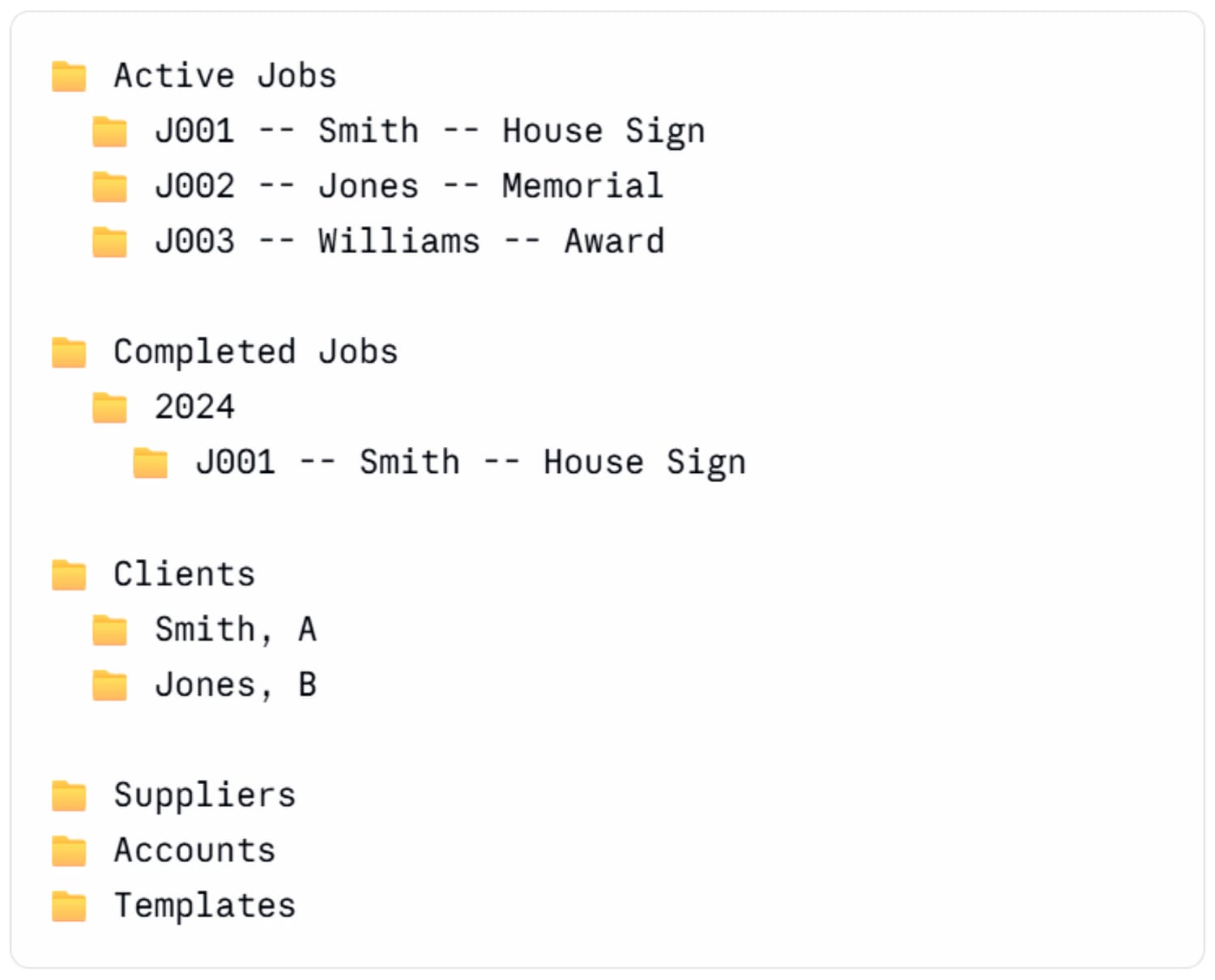
Active jobs are at the top level so you see them immediately. Completed jobs move to the archive once delivered. Clients folder holds anything that is not job-specific - correspondence, notes, ongoing relationship details.
The key is that every folder name tells you what is in it before you open it.
The Google Drive question
If you work across multiple devices - phone in the studio, laptop at the desk, tablet on the road - your files need to live somewhere that goes with you.
Google Drive is the obvious answer for most small businesses. It is free up to 15GB, works on every device, and has a search function that is genuinely excellent. If your files are named consistently, Drive's search will find anything you have ever saved in seconds.
The search tip most people miss: Drive searches file names AND file contents. A PDF of a quote is searchable by the client name inside it even if the file name does not include their name. Consistent naming plus Drive search is a powerful combination.
Start now, not later
The time to fix your filing system is always now, not when you have a quieter week. A quieter week does not come.
You do not have to go back and rename everything. Start with the next job you take on. Apply the naming convention from the first document you create. Build the folder before you save the first file. Do it once, do it right, and let the habit compound.
Three months from now you will be able to find anything from the past three months in under thirty seconds. That is worth twenty minutes of setup today.
One more thing
If you want a business organisation system that does the filing for you - creating folders automatically for every new job and linking everything together - that is exactly what Just Three Places does.
Every commission you log creates its own folder in your Google Drive, named and structured consistently, with every file in the right place from the moment you submit the job form.
The naming convention is built in.
The folder structure is automatic. You just use it.

Rosie Glassey
Rosie has run Pooil Vaaish Engraving on the Isle of Man for 27 years. She knows what it’s like to be the person who does ALL THE THINGS — from designing and making custom products to marketing, finances and brewing the tea. Just Three Places is the system she built to keep the making part from drowning in everything else.
Stay in touch
If you’d like to hear when new blog posts go up, when new products launch, or when there’s something genuinely useful to share — leave your name and email below.
Rosie Glassey
Stone engraver and creative
based on the Isle of Man.
rosieglassey.co.uk


© 2026 Rosie Glassey. Created with care in the Isle of Man.